
Construct IN
Cases
24 de jan. de 2025
Photographic Report of a Project: importance and how to do it
Photographic Report of a Project: importance and how to do it
Discover what the Photo Report is, its importance, and see important tips from Construct IN on how to create yours!
Discover what the Photo Report is, its importance, and see important tips from Construct IN on how to create yours!


Tales Silva
CEO & founder, Construct IN
cOMPARTILHE NAS REDES
cOMPARTILHE NAS REDES

Managing a construction project can seem quite complicated. With so much going on, how can you be sure that everything is moving forward as it should? That's why there is a resource that can help you: the Construction Photo Report.
Continue reading and check out more details about this feature. By the end of the article, see:
What is the Construction Photo Report?
What is the purpose of a photo report?
4 reasons to create a Construction Photo Report
Initial tips on how to make a photo report
How to set up the Construction Photo Report?
Generate your Construction Photo Report with Construct IN
What is the Construction Photo Report?
The Construction Photo Report is a set of photos taken in an organized manner that show how the construction is progressing over time.
- Read also: Technical Visit Report in Construction: what it is and how to make it
What is the purpose of a photo report?
To facilitate construction monitoring, identify issues, and communicate with everyone involved in the project. Since the Construction Photo Report is a detailed historical record, it helps ensure that everything is in accordance with the necessary standards and regulations.
4 reasons to create a Construction Photo Report
1. Detailed documentation
The Construction Photo Report serves as a visual diary of the project. It documents each stage of the construction, offering a clear view of progress and allowing the identification of any deviations or problems that need to be corrected.
2. Effective communication
It facilitates communication among everyone involved in the project. With clear and current photos, it is easier to explain complex situations to managers, investors, and clients.
3. Support in decision-making
Photos can help in decision-making, especially when they need to be quick and well-informed. An image can reveal details that written reports might not capture.
In conventional photos, those taken from cell phones or ordinary cameras, the person making the record needs to be well-guided on the angles and parts of the site that should be in those images. All of this is essential to not forget to record something important.
In the case of 360° cameras, used by those who hire Construct IN, this concern is not necessary because it captures all angles of the environment.
4. Compliance record
In many cases, the photo report is used to prove compliance with technical, safety, and environmental standards, which is essential in audits and certification processes.
Initial tips on how to make a photo report
Did you know that with the Construct IN platform you can create your own photo report much more easily and also develop the Daily Construction Report (DCR)?
But to start preparing it, you need to pay attention to the pre-report stage. This tip applies to those who use Construct IN or are going to create this report manually.
1. Create a routine for taking photos
Whether daily, weekly, or according to the project's progress, the ideal is to maintain the same lighting, angles, and locations when taking the photos. Doing so makes it easier to compare how the job site is changing over time.
Those who hire Construct IN can take 360° photos of the entire construction site and resolve these issues related to angles, positions, and lighting. Understand a bit more about our solution:
2. Use high-quality cameras
In low-light places, it is good to take extra care. Modern cell phones generally work well, but check if the photos are of good quality so you can analyze the details.
With Construct IN, photos are taken with specific types of 360° cameras. The most used here is the RICOH THETA SC2, because it has excellent image quality and meets almost all types of projects, whether large or small.
- Read also: 360º Cameras and AI: transform the management and safety of your construction sites
3. Tag each photo with the date and time it was taken
It is also good to include a quick description of what is in the photo. This helps avoid confusion and makes the report more useful during and after construction.
With Construct IN, this recording is automatic, and you can navigate through photos based on dates with just a few clicks.
Not to mention that when using the Screenshot feature to make notes, they can be used to generate photo reports. When capturing with a split screen, for example, you already have a comparison between different dates, making it easier to create a report showing the progress of the construction over a certain period.
Watch this video:
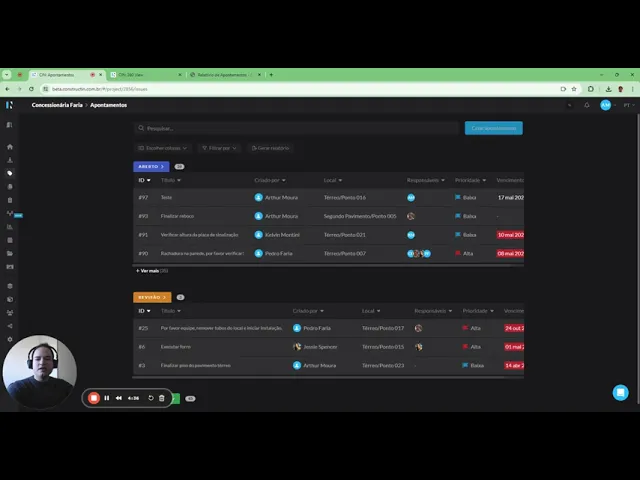
Furthermore, photos on the Construct IN platform are linked to the location where they were recorded through the uploaded floor plan. This happens because, at the moment of capture, the person needs to indicate in the Construct IN app where they are taking the image.
In contrast, with conventional photographs, the person has to organize themselves to write down or record the exact location where the photo was taken, which is much more work.
4. Be careful not to violate privacy or safety
Avoid taking photos of people without consent and focus on the technical details of the construction.
Here on the Construct IN platform, you can hire an extra service called automatic Face Blur. It blurs the faces of people appearing in photos so that the images comply with the General Data Protection Regulation (GDPR).
5. Organize photos logically and store them in a system
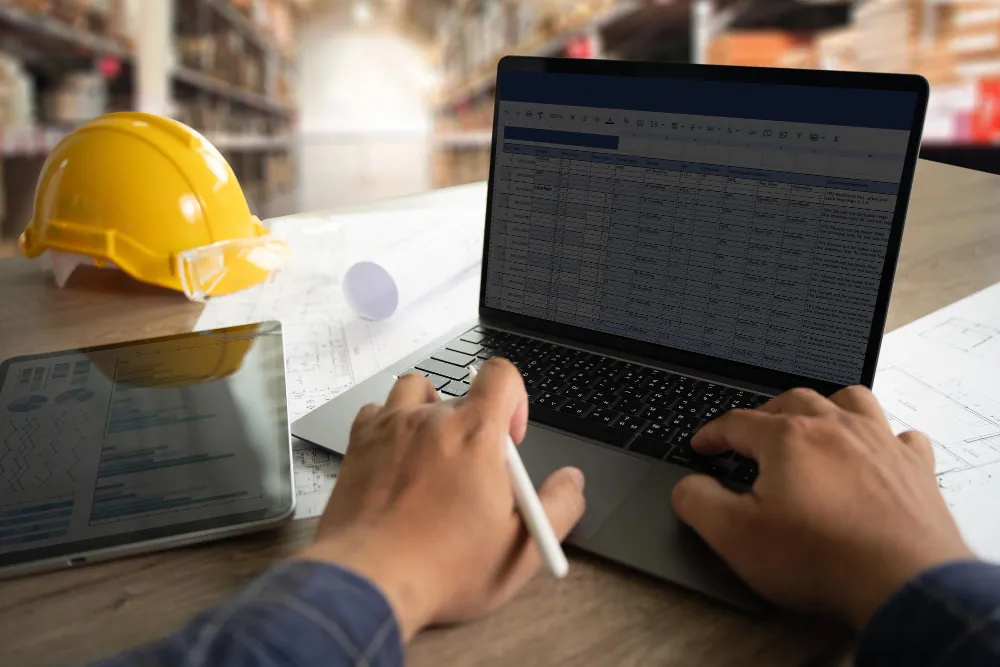
If you don't have the help of a platform like Construct IN, there is a need to take the photos, transfer them to the computer, organize them into folders, change the names, list the dates... all manually. There are also people who make the Construction Photo Report in Excel.
Now, when you decide to hire Construct IN, this organization is done automatically and at the moment the image is captured. Not to mention that it stores this data in a single place, making it an easy-access source of information for the entire team.
How to set up the Construction Photo Report?
If the necessary information is at hand, it is time to create the report. See the data that cannot be missed:
1. Create a header with basic details:
The Construction Photo Report should start with a clear and straightforward header that includes:
Project name;
Exact location of the site (complete address or detailed description of the location);
Date the report is being compiled and delivered;
Name of the person responsible for taking the photos or the report coordinator.
2. Place the images
Place the images and the dates they were taken. Each photo should have a brief explanatory text detailing what is being shown, such as: construction phases, materials used, or important equipment.
Do not forget to identify the exact location within the construction site where the photo was taken. You can facilitate this by referencing a map or site plan, which helps contextualize the images in the construction space.
Using the Construct IN platform will make this much easier! The image will already be linked to the point where the note was created. The report will present the image and the point on the plan it refers to.
- Read also: Images in construction: how to analyze them?
3. Write notes and observations
If something is not as expected, this should be highlighted with observations about what might be wrong and suggestions for actions to resolve the identified issues. Feel free to include any other relevant comments that help understand the context of the photos or the status of the construction at that moment.
In Construct IN, you have a very practical feature called Observations. With it, it is easier to assemble quick reports because you can add photos and comments directly. It is very useful for making checklists on site, checking if everything is being done correctly, inspecting labor safety, and much more.
4. Construction progress
Include in the report a general evaluation of progress relative to the planned construction schedule. It is important to highlight any changes or developments that have occurred since the last report, so everyone can clearly visualize how the project is evolving over time.
5. Compliance with standards
It is essential to verify and document if all procedures and materials used on site are in compliance with safety and quality standards. It is also important to ensure that the project meets environmental laws and regulations, especially in projects subject to environmental inspections.
6. Leave a space for a signature
Include a space in the report for the signature of the person responsible, validating the information presented. In addition, reserve a space for signatures from supervisors, engineers, construction managers, and other professionals who need to approve the document.

Hire Construct IN to facilitate the monitoring of your projects and the generation of photo reports
With the remote construction management software Construct IN, you reduce on-site visits by up to 50%, decrease inspection time, and lower travel costs. One of the greatest benefits is that you will be able to remotely monitor how construction is progressing with the help of 360° images.
Additionally, you will be able to integrate BIM, put all information in one place, generate dashboards, and reports like the construction photo report, among others.
More than 200 clients, such as Petz, Engeform, and Grupo Alife Nino have already seen the benefits of hiring our platform. Now it's just your turn.
Managing a construction project can seem quite complicated. With so much going on, how can you be sure that everything is moving forward as it should? That's why there is a resource that can help you: the Construction Photo Report.
Continue reading and check out more details about this feature. By the end of the article, see:
What is the Construction Photo Report?
What is the purpose of a photo report?
4 reasons to create a Construction Photo Report
Initial tips on how to make a photo report
How to set up the Construction Photo Report?
Generate your Construction Photo Report with Construct IN
What is the Construction Photo Report?
The Construction Photo Report is a set of photos taken in an organized manner that show how the construction is progressing over time.
- Read also: Technical Visit Report in Construction: what it is and how to make it
What is the purpose of a photo report?
To facilitate construction monitoring, identify issues, and communicate with everyone involved in the project. Since the Construction Photo Report is a detailed historical record, it helps ensure that everything is in accordance with the necessary standards and regulations.
4 reasons to create a Construction Photo Report
1. Detailed documentation
The Construction Photo Report serves as a visual diary of the project. It documents each stage of the construction, offering a clear view of progress and allowing the identification of any deviations or problems that need to be corrected.
2. Effective communication
It facilitates communication among everyone involved in the project. With clear and current photos, it is easier to explain complex situations to managers, investors, and clients.
3. Support in decision-making
Photos can help in decision-making, especially when they need to be quick and well-informed. An image can reveal details that written reports might not capture.
In conventional photos, those taken from cell phones or ordinary cameras, the person making the record needs to be well-guided on the angles and parts of the site that should be in those images. All of this is essential to not forget to record something important.
In the case of 360° cameras, used by those who hire Construct IN, this concern is not necessary because it captures all angles of the environment.
4. Compliance record
In many cases, the photo report is used to prove compliance with technical, safety, and environmental standards, which is essential in audits and certification processes.
Initial tips on how to make a photo report
Did you know that with the Construct IN platform you can create your own photo report much more easily and also develop the Daily Construction Report (DCR)?
But to start preparing it, you need to pay attention to the pre-report stage. This tip applies to those who use Construct IN or are going to create this report manually.
1. Create a routine for taking photos
Whether daily, weekly, or according to the project's progress, the ideal is to maintain the same lighting, angles, and locations when taking the photos. Doing so makes it easier to compare how the job site is changing over time.
Those who hire Construct IN can take 360° photos of the entire construction site and resolve these issues related to angles, positions, and lighting. Understand a bit more about our solution:
2. Use high-quality cameras
In low-light places, it is good to take extra care. Modern cell phones generally work well, but check if the photos are of good quality so you can analyze the details.
With Construct IN, photos are taken with specific types of 360° cameras. The most used here is the RICOH THETA SC2, because it has excellent image quality and meets almost all types of projects, whether large or small.
- Read also: 360º Cameras and AI: transform the management and safety of your construction sites
3. Tag each photo with the date and time it was taken
It is also good to include a quick description of what is in the photo. This helps avoid confusion and makes the report more useful during and after construction.
With Construct IN, this recording is automatic, and you can navigate through photos based on dates with just a few clicks.
Not to mention that when using the Screenshot feature to make notes, they can be used to generate photo reports. When capturing with a split screen, for example, you already have a comparison between different dates, making it easier to create a report showing the progress of the construction over a certain period.
Watch this video:
Furthermore, photos on the Construct IN platform are linked to the location where they were recorded through the uploaded floor plan. This happens because, at the moment of capture, the person needs to indicate in the Construct IN app where they are taking the image.
In contrast, with conventional photographs, the person has to organize themselves to write down or record the exact location where the photo was taken, which is much more work.
4. Be careful not to violate privacy or safety
Avoid taking photos of people without consent and focus on the technical details of the construction.
Here on the Construct IN platform, you can hire an extra service called automatic Face Blur. It blurs the faces of people appearing in photos so that the images comply with the General Data Protection Regulation (GDPR).
5. Organize photos logically and store them in a system
If you don't have the help of a platform like Construct IN, there is a need to take the photos, transfer them to the computer, organize them into folders, change the names, list the dates... all manually. There are also people who make the Construction Photo Report in Excel.
Now, when you decide to hire Construct IN, this organization is done automatically and at the moment the image is captured. Not to mention that it stores this data in a single place, making it an easy-access source of information for the entire team.
How to set up the Construction Photo Report?
If the necessary information is at hand, it is time to create the report. See the data that cannot be missed:
1. Create a header with basic details:
The Construction Photo Report should start with a clear and straightforward header that includes:
Project name;
Exact location of the site (complete address or detailed description of the location);
Date the report is being compiled and delivered;
Name of the person responsible for taking the photos or the report coordinator.
2. Place the images
Place the images and the dates they were taken. Each photo should have a brief explanatory text detailing what is being shown, such as: construction phases, materials used, or important equipment.
Do not forget to identify the exact location within the construction site where the photo was taken. You can facilitate this by referencing a map or site plan, which helps contextualize the images in the construction space.
Using the Construct IN platform will make this much easier! The image will already be linked to the point where the note was created. The report will present the image and the point on the plan it refers to.
- Read also: Images in construction: how to analyze them?
3. Write notes and observations
If something is not as expected, this should be highlighted with observations about what might be wrong and suggestions for actions to resolve the identified issues. Feel free to include any other relevant comments that help understand the context of the photos or the status of the construction at that moment.
In Construct IN, you have a very practical feature called Observations. With it, it is easier to assemble quick reports because you can add photos and comments directly. It is very useful for making checklists on site, checking if everything is being done correctly, inspecting labor safety, and much more.
4. Construction progress
Include in the report a general evaluation of progress relative to the planned construction schedule. It is important to highlight any changes or developments that have occurred since the last report, so everyone can clearly visualize how the project is evolving over time.
5. Compliance with standards
It is essential to verify and document if all procedures and materials used on site are in compliance with safety and quality standards. It is also important to ensure that the project meets environmental laws and regulations, especially in projects subject to environmental inspections.
6. Leave a space for a signature
Include a space in the report for the signature of the person responsible, validating the information presented. In addition, reserve a space for signatures from supervisors, engineers, construction managers, and other professionals who need to approve the document.
Hire Construct IN to facilitate the monitoring of your projects and the generation of photo reports
With the remote construction management software Construct IN, you reduce on-site visits by up to 50%, decrease inspection time, and lower travel costs. One of the greatest benefits is that you will be able to remotely monitor how construction is progressing with the help of 360° images.
Additionally, you will be able to integrate BIM, put all information in one place, generate dashboards, and reports like the construction photo report, among others.
More than 200 clients, such as Petz, Engeform, and Grupo Alife Nino have already seen the benefits of hiring our platform. Now it's just your turn.
Sobre o autor
Tales Silva
CEO & founder, Construct IN
Tales Silva é Engenheiro Civil formado pela PUCRS (2016) e possui MBA Executivo com foco em marketing pela ESPM-Sul (2019). Tem experiência em projetos estruturais e em construções industrializadas. É fundador e CEO da Construct IN, construtech que oferece uma plataforma de gestão e documentação de obras por meio de imagens 360º.
cOMPARTILHE NAS REDES
Recomendado para você
carregar mais ↓

Subscribe to our newsletter
Explore nossas soluções
Entre em contato e descubra como a captura da realidade e dados centralizados podem ser a solução para a gestão de suas obras.
